I'm looking for either the install software, or a disk image of a working system. I had a hard drive go poof and I can't find the install disk. I've tried Harris, who sold this unit originally, I've tried Wheatstone who bought VoxPro from Harris/Gates Air. They are unable to help (unless I'd like to buy a brand new PC version). I know. This is 20+ year old software. I'm hoping someone has the disk in the back of a software file cabinet somewhere and would be willing to rip it to an image file. I have the controller, I have the security dongle, I have the machine. I had version 1.8.3, but I suspect any version made for Mac would work with my dongle and control surface. I really appreciate anyone who might take a look and see if they can find this for me! I'll happily reward you for your trouble and time! Thanks!

-
Get involved.
We want your input!
Apply for Membership and join the conversations about everything related to broadcasting.
After we receive your registration, a moderator will review it. After your registration is approved, you will be permitted to post.
If you use a disposable or false email address, your registration will be rejected.
After your membership is approved, please take a minute to tell us a little bit about yourself.
https://www.radiodiscussions.com/forums/introduce-yourself.1088/
Thanks in advance and have fun!
RadioDiscussions Administrators
You are using an out of date browser. It may not display this or other websites correctly.
You should upgrade or use an alternative browser.
You should upgrade or use an alternative browser.
Mac Version of VoxPro
- Thread starter SHOTGUNJAXON
- Start date

Good luck! I grew up listening to you in KC, welcome to the board!
Thanks so much!Good luck! I grew up listening to you in KC, welcome to the board!

You might post this on the Engineering board, too. You could also check about posting at Barry Mishkind's site: HomeI'm looking for either the install software, or a disk image of a working system. I had a hard drive go poof and I can't find the install disk. I've tried Harris, who sold this unit originally, I've tried Wheatstone who bought VoxPro from Harris/Gates Air. They are unable to help (unless I'd like to buy a brand new PC version). I know. This is 20+ year old software. I'm hoping someone has the disk in the back of a software file cabinet somewhere and would be willing to rip it to an image file. I have the controller, I have the security dongle, I have the machine. I had version 1.8.3, but I suspect any version made for Mac would work with my dongle and control surface. I really appreciate anyone who might take a look and see if they can find this for me! I'll happily reward you for your trouble and time! Thanks!
Worth a shot! Thanks for the suggestion!You might post this on the Engineering board, too. You could also check about posting at Barry Mishkind's site: Home
Just to update... Thanks to some hand holding and some "explain it to me like I'm five" conversations with a few very smart Mac nerds, I'm back in business! Turned out the drive wasn't totally lost. It "simply" had a corrupted "directory". I guess this was common on this vintage of Macs. Common enough for there to be software dedicated to repairing corrupted directories. Used a standalone HD cloner to copy the "bad" drive to a new SSD, then ran the DiskWarrior software on the SSD. Came back to where it was in 2001! Thanks all for giving this some thought, and maybe even digging through old software boxes! I have this saved in multiple places now. Boom! VoxPro 1.8.5 is ALIVE!
Attachments
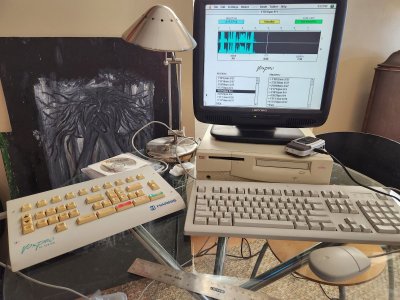

Glad to see you're back in business. As your Mac friends probably said; the directory usually gets screwed up by running out of drive space. Make sure to keep an eye on the number of sound files left on the box, and back them off to another drive rather than archive them on the VOXpro.Just to update... Thanks to some hand holding and some "explain it to me like I'm five" conversations with a few very smart Mac nerds, I'm back in business! Turned out the drive wasn't totally lost. It "simply" had a corrupted "directory". I guess this was common on this vintage of Macs. Common enough for there to be software dedicated to repairing corrupted directories. Used a standalone HD cloner to copy the "bad" drive to a new SSD, then ran the DiskWarrior software on the SSD. Came back to where it was in 2001! Thanks all for giving this some thought, and maybe even digging through old software boxes! I have this saved in multiple places now. Boom! VoxPro 1.8.5 is ALIVE!
I got quite an education in Mac OS 7.6.1through OS 9 from all of this. And I introduced myself to BLUESCSI. I have a pico based box that I can plug into the DB25 connector on any mac and it uses a MicroSD card as a hard drive... or many hard drives. Anyway, I have the VoxPro folder backed up on that, plus the original hard drive that was in this machine is imaged on it, and a couple of operating system install disks. I won't be saving audio on this machine. It'll be used a lot like it was used originally. I'll use it for phoners in my home studio. If I want to save something, I'll dub it to my PC. But if it crashes, I have the software, the control surface, and the dongle. Even if the computer blows up, I can get up and running on another PowerMac. And I now have two more of those!Glad to see you're back in business. As your Mac friends probably said; the directory usually gets screwed up by running out of drive space. Make sure to keep an eye on the number of sound files left on the box, and back them off to another drive rather than archive them on the VOXpro.
Good job! Keep that stuff going!
Charlie Brown- inventor of VoxPro Hey Shotgun, your VoxPro has now long since outlasted its inventor!
- Status
- This thread has been closed due to inactivity. You can create a new thread to discuss this topic.