Hello, I am looking for a time calculator app that allows multiple inputs; not just a two-field add/subtract function. Example: I need to fill 1:30 break with a combination of voice tracking and other audio of varying lengths. It's a challenge to figure out I can do it with a :23, a :07, a :39, a :05, a :15 and a :20. A time calculator will help. Any recommendations, please?

-
Get involved.
We want your input!
Apply for Membership and join the conversations about everything related to broadcasting.
After we receive your registration, a moderator will review it. After your registration is approved, you will be permitted to post.
If you use a disposable or false email address, your registration will be rejected.
After your membership is approved, please take a minute to tell us a little bit about yourself.
https://www.radiodiscussions.com/forums/introduce-yourself.1088/
Thanks in advance and have fun!
RadioDiscussions Administrators
You are using an out of date browser. It may not display this or other websites correctly.
You should upgrade or use an alternative browser.
You should upgrade or use an alternative browser.
WANTED: Time Calculator Recommendation
- Thread starter Airbag
- Start date
Until you find a local application, here's an online substitute that allows you to write your own expressions freehand:
https://www.calculator.net/time-cal...5s + 15s + 20s&ctype=3&x=Calculate#expression
https://www.calculator.net/time-cal...5s + 15s + 20s&ctype=3&x=Calculate#expression

K.M. Richards
Program Director, The Eighties Channel™
I downloaded a small (36KB) application years ago, which was written by a Colorado State University student in 2000. But the university rearranged their servers a couple of years ago, and apparently that former student's directory was not recreated.
But it is a standalone app and does not require installation; if you PM me your address I will send you a copy, as it was freeware from the start.
But it is a standalone app and does not require installation; if you PM me your address I will send you a copy, as it was freeware from the start.
K.M. Richards
Program Director, The Eighties Channel™
Why not just do it in Excel?
Okay, tell me why "doing it in Excel" is faster than this scenario:
I have the cue sheet for a four-hour syndicated program which gives me the timing for each segment with the commercials included. I also have the traffic log which tells me how much local commercial time is scheduled in each local break, but I know that the total scheduled is not going to fill all of the syndicator's local time allowance. I need to schedule some direct response spots, all of the breaks have to come close to what the cue sheets allow for, and every hour has to be between 59:30 and 60:30 in length.
Doing all that in a spreadsheet is much more difficult than using a calculator-type interface.
K.M. Richards
Program Director, The Eighties Channel™
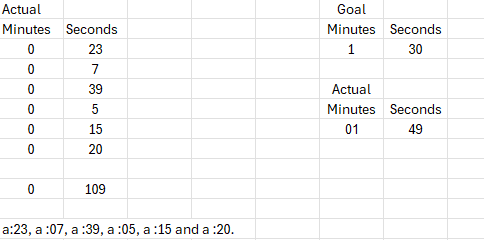
A quick and dirty spreadsheet for the problem given (at the bottom). Answer seems to indicate you use all but the 15 second spot (within a second). I would have to work on the spreadsheet to try and solve the problem automatically.
View attachment 10566
For something as simple as the OP's original scenario, sure. For what I'm doing, it would take less time using TimeCalc than setting up the spreadsheet calculations.

I realize you want a time calculator, but this is a fairly simple problem to do with any old four-function calculator, as long as you can mentally convert minutes and seconds into all seconds. (And if even that's too tough, create an index-card crib sheet.) You can use the cheapest of cheapo calculators, or the calculator widget on your Windows PC or Mac, or any calculator app on your phone/tablet.Hello, I am looking for a time calculator app that allows multiple inputs; not just a two-field add/subtract function. Example: I need to fill 1:30 break with a combination of voice tracking and other audio of varying lengths. It's a challenge to figure out I can do it with a :23, a :07, a :39, a :05, a :15 and a :20. A time calculator will help. Any recommendations, please?
In your example, start by converting 1:30 into 90 seconds. Punch that into the calculator. Then subtract the lengths of the various pieces that have to fit within that 90 seconds, element-by-element (also in seconds), from the running total until you go negative. The last number you subtracted before going into the red can be added back, and another element that's smaller can be subtracted until you're hit zero or get near enough to it. I know it's not as sophisticated as you'd like, but it's cheap and it'll work on any device.
I found something very similar by searching for timecalc.exe on a whim:I downloaded a small (36KB) application years ago, which was written by a Colorado State University student in 2000. But the university rearranged their servers a couple of years ago, and apparently that former student's directory was not recreated.
But it is a standalone app and does not require installation; if you PM me your address I will send you a copy, as it was freeware from the start.
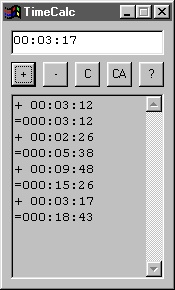
Freeware, 28 KB, no installer, by an Austrian programmer, made in 2000. Download location: https://peter-wienerroither.at/pwcomsw.htm#timecalc
Perhaps this is the same person who originally offered it on that CSU site?
K.M. Richards
Program Director, The Eighties Channel™
Perhaps this is the same person who originally offered it on that CSU site?
No, as near as I have been able to ascertain, the one I have was created by a Brazilian exchange student a quarter-century ago.
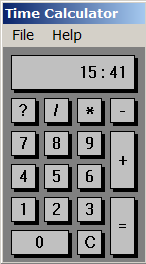
It differs from the one you found by having a calculator-style interface:
(Image did not upload because there is apparently a glitch with the temporary directory on the RD server. I will try again later if you want to see it.)
K.M. Richards
Program Director, The Eighties Channel™
K.M. Richards
Program Director, The Eighties Channel™
Thanks for all the replies. My engineer recommended one (made by Quackstro): Hours Minutes Time Calculator. So far; so good!
At least now you have two free alternatives if you need them!