

...or else this will happen
On Wednesday afternoon, we signed on our brand new GV20 transmitter for KEGK. We also went HD with our brand new gen4 HD Multicast+ box. Once we got it on, we heard occasional half-second dropouts of audio on HD-1. While irritating, they happened seldom enough that it was low on the priorities list.
I started driving around to assess how far out the HD signal went (so that we could tell the station owner how good what he spent money on was, of course) and about an hour and a half into having HD on I heard that sound in the video halfway into a song. Weird. Remote in, restart the importer software, life's good. Another hour and a half goes by and I suddenly hear it start again in the middle of a song. Now that it's a problem we switch off HD and run down to the tower site.
It's obviously some kind of sample clocking and buffer underrun problem, so we start investigating the Lynx AES sound card in the HD importer. Comparing our settings to our other boxes, I noticed that the "preferred clock source" in the Lynx mixer was set to "internal" while all of the other boxes we had access to were set to "header". What that means is that it has an internal clock on the Lynx card clocking samples 44100 times per second. The header option clocks samples from an external clock which is connected internally to a header on the sound card's board.
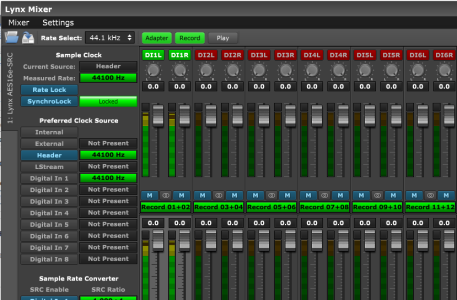
Sure enough, in the Multicast+ manual, it mentions that the internal GPS receiver is connected to the sound card to provide a reference sample clock, and that "header" should be the clock source selected. Here's a screenshot of what our config currently looks like.
After that clock source was switched, we haven't had any problems at all. Three days later I haven't heard a single dropout since or any kind of demonic screeching. That setting is supposed to be configured correctly out of the box, so I'm not sure how that happened. Windows updates were supposed to be disabled out of the box too, but that wasn't changed either and our box rebooted to update the first night. Not sure if our box was just not fully configured or what haha. It also surprises me that there's enough error on the internal clock source to cause dropouts and failure within a couple of hours!
tl;dr; Make sure that the preferred clock source is set to "header" on your HD Multicast boxes in the Lynx mixer or else HD will fail in such a way no alarm would be able to catch. I'm just glad I was listening when it happened and was able to switch it off quick, because otherwise our station may as well have been off the air for anyone with an HD receiver and we would've had no idea
On Wednesday afternoon, we signed on our brand new GV20 transmitter for KEGK. We also went HD with our brand new gen4 HD Multicast+ box. Once we got it on, we heard occasional half-second dropouts of audio on HD-1. While irritating, they happened seldom enough that it was low on the priorities list.
I started driving around to assess how far out the HD signal went (so that we could tell the station owner how good what he spent money on was, of course) and about an hour and a half into having HD on I heard that sound in the video halfway into a song. Weird. Remote in, restart the importer software, life's good. Another hour and a half goes by and I suddenly hear it start again in the middle of a song. Now that it's a problem we switch off HD and run down to the tower site.
It's obviously some kind of sample clocking and buffer underrun problem, so we start investigating the Lynx AES sound card in the HD importer. Comparing our settings to our other boxes, I noticed that the "preferred clock source" in the Lynx mixer was set to "internal" while all of the other boxes we had access to were set to "header". What that means is that it has an internal clock on the Lynx card clocking samples 44100 times per second. The header option clocks samples from an external clock which is connected internally to a header on the sound card's board.
Sure enough, in the Multicast+ manual, it mentions that the internal GPS receiver is connected to the sound card to provide a reference sample clock, and that "header" should be the clock source selected. Here's a screenshot of what our config currently looks like.
After that clock source was switched, we haven't had any problems at all. Three days later I haven't heard a single dropout since or any kind of demonic screeching. That setting is supposed to be configured correctly out of the box, so I'm not sure how that happened. Windows updates were supposed to be disabled out of the box too, but that wasn't changed either and our box rebooted to update the first night. Not sure if our box was just not fully configured or what haha. It also surprises me that there's enough error on the internal clock source to cause dropouts and failure within a couple of hours!
tl;dr; Make sure that the preferred clock source is set to "header" on your HD Multicast boxes in the Lynx mixer or else HD will fail in such a way no alarm would be able to catch. I'm just glad I was listening when it happened and was able to switch it off quick, because otherwise our station may as well have been off the air for anyone with an HD receiver and we would've had no idea