
• Get involved.
    We want your input!
    Apply for Membership and join the conversations about everything related to broadcasting.

    After we receive your registration, a moderator will review it. After your registration is approved, you will be permitted to post.
    If you use a disposable or false email address, your registration will be rejected.

    After your membership is approved, please take a minute to tell us a little bit about yourself.
    https://www.radiodiscussions.com/forums/introduce-yourself.1088/

    Thanks in advance and have fun!
    RadioDiscussions Administrators

Software audio processing that hangs tough with an Optimod

W

westlife

Guest
After fiddling around with Sound Solution and various other software audio processing schemes, I came across an audio processing plugin known simply as "Limit", contained within John Burnill's "Sonos" audio application suite. As John described it on his web site, "A basic audio processor. Features are AGC, Compressor, Limiter and Pre-Emphasis. Limit is also available as a DX (Direct Show) plugin." John's web site is currently offline for some reason, but you can view Google's cache of the Sonos page <a target="_blank" href=http://64.233.179.104/search?q=cache:eek:RNaJM9w46gJ:www.burnill.co.uk/sonos.php+&hl=en>here</a>.

"Limit" is a humble wideband audio processor (see the block diagram below), and with <a target="_blank" href=http://www.gmixon.com/en/tele/tele-logiciels.asp>"Adapt-X"</a>, it can be used as a WinAmp 2.x/5.x DSP plugin. But the amazing thing is, with a little tweaking, I have been able to get it to come within 2 dB of the loudness of the Optimod 8400's "Gregg" preset (based on the audio samples posted on <a target="_blank" href=http://www.orban.com/orban/products/radio/fm/8400hd_audioclips.html>Orban's web site</a>)! With a high-quality sound card and the FM Stereo MPX generator software recently mentioned here, this allows you to have a very competitive on-air sound without spending a dime on hardware audio processing, and without exceeding FCC bandwidth and modulation regulations.
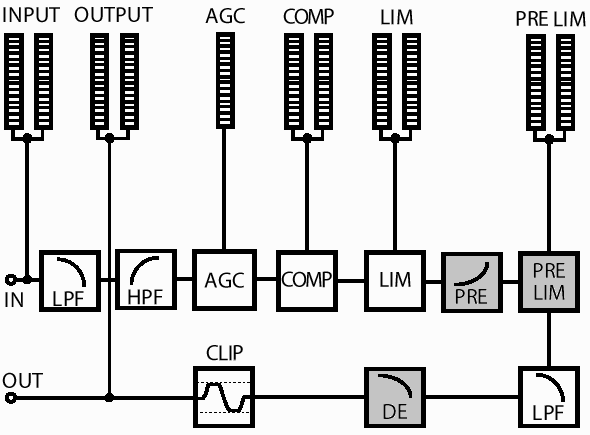
optidiag.gif


<a target="_blank" href=http://www.geocities.com/kevtronics/optimax.zip>Click here</a> to download a ZIP archive containing the "Limit" audio processor, the Adapt-X WinAmp DSP plugin adapter, and a set of five processing presets I designed for it. UnZIP this file in your WinAmp Plugins folder (typically C:program FilesWinampPlugins) and then run "RegSonosPlugins.exe" from the DOS prompt in that directory (type CD PROGRA~1WINAMPPLUGINS first). You may need to restart Windows at this point.

Next, start up Winamp and select "GMixon DirectX Plugin Adapter Module" as your DSP plugin. When the GMixon window opens, click the + button, and double-click "Limit". The processing window will open, and click the check mark next to Limit to activate it. You're now ready to rock and roll!

optimax.gif


If you've used Sound Solution or a hardware audio processor, the various settings will be pretty much self-explanatory once you fiddle with them. Use File/Open to load one of the five presets I prepared. In order from the least aggressive ("quietest") to the most aggressive ("loudest"), they are "AmigaFM", "DiSP-X", "Onmia", "Volumod", and "Optimax". All are configured for 15 kHz FM audio bandwidth and 75 uS pre-emphasis with matching de-emphasis. AM Wide (~9 kHz NRSC-compliant) and AM Narrow (~5.5 kHz) bandwidths are also available. And if you right-click, you'll find lots of options to change the colors and fonts and meter behavior of the on-screen display.

I recommend the "DiSP-X" preset for the best balance between loudness and quality. "Onmia" and "Optimax" are louder, but may suffer from some clipping distortion (just like the similarly-named hardware processors). "Volumod" is almost as loud as "Optimax" but uses more compression for a slight pumping effect, good for Oldies and Rhythmic formats. "AmigaFM" is the most relaxed, with surprising high-end crispness.

And if you want to transform "Limit" into an awesome multiband audio processor, use to place <a target="_blank" href=http://www.rockradio.freeserve.co.uk/pub/winamp_plugins/audiostocker.zip>AudioStocker ahead of it. Set AudioStocker for 12 dB Range, +6 dB Max EQ, and Very Soft Compression, and you'll have perfect multiband "sweetening" to use together with your favorite Limit preset!
<P ID="signature">______________

noiboc.jpg
</P>
 
The *ONLY* fair way to compare something like this, is to observe the *ABSOLUTE* peak control at the output, on a storage scope. The various software apps, like this, I've tested, don't offer the precision peak control control that an Omnia or Optimod provide. Also, they do not offer the clipper-distortion control needed.

-Frank Foti

> After fiddling around with Sound Solution and various other
> software audio processing schemes, I came across an audio
> processing plugin known simply as "Limit", contained within
> John Burnill's "Sonos" audio application suite. As John
> described it on his web site, "A basic audio processor.
> Features are AGC, Compressor, Limiter and Pre-Emphasis.
> Limit is also available as a DX (Direct Show) plugin."
> John's web site is currently offline for some reason, but
> you can view Google's cache of the Sonos page here.
>
 
Re: Software audio processing -- Inovonics, powered by MBL4?

> The *ONLY* fair way to compare something like this, is to
> observe the *ABSOLUTE* peak control at the output, on a
> storage scope. The various software apps, like this, I've
> tested, don't offer the precision peak control control that
> an Omnia or Optimod provide.

Software audio processors will be more than happy to clip your audio into a perfect square wave if you ask them to. The main stumbling block therefore becomes your PC's ability to pass this audio to the transmitter without introducing any waveform tilt or peak overshoot. That ultimately depends on the quality of your sound card's DAC -- and some are definitely much better than others.

And for what it's worth, I noticed that Mr. Burnill's "Limit" and MBL4 software processors use the same exact user interface as the PC control software for the Inovonics Omega FM audio processor. In fact, the Omega FM appears to use the same core processing scheme as MBL4, and even shares many of its basic characteristics (especially in the AGC and Limiter sections) with "Limit". Could the Omega FM be a hardware implementation of Burnill's software audio processing structure? If so, that's likely why his web site is no longer online -- who would pay the Omega FM's list price of $5880 when you could download a software-based replica of its "guts" for free?

omega_fmr.jpg


<P ID="signature">______________
noiboc.jpg
</P>
 
Re: Software audio processing -- Inovonics, powered by MBL4?

> > The *ONLY* fair way to compare something like this, is to
> > observe the *ABSOLUTE* peak control at the output, on a
> > storage scope. The various software apps, like this, I've
> > tested, don't offer the precision peak control control
> that
> > an Omnia or Optimod provide.
>
> Software audio processors will be more than happy to clip
> your audio into a perfect square wave if you ask them to.
> The main stumbling block therefore becomes your PC's ability
> to pass this audio to the transmitter without introducing
> any waveform tilt or peak overshoot. That ultimately
> depends on the quality of your sound card's DAC -- and some
> are definitely much better than others.

I've yet to see *ANY* soundcard offer overshoot-free output. Any square wave will need to be filtered, and unless the low pass filter on the soundcard has overshoot compensation, which I highly doubt, there will be overshoot. Also, the low pass filter must be phase linear, or the overshoots can be as little as 9% or reach as high as to 70%.

-Frank Foti
 
Inovonics, powered by MBL4!

> And for what it's worth, I noticed that Mr. Burnill's
> "Limit" and MBL4 software processors use the same exact user
> interface as the PC control software for the Inovonics Omega
> FM audio processor. In fact, the Omega FM appears to use
> the same core processing scheme as MBL4, and even shares
> many of its basic characteristics (especially in the AGC and
> Limiter sections) with "Limit". Could the Omega FM be a
> hardware implementation of Burnill's software audio
> processing structure? If so, that's likely why his web site
> is no longer online -- who would pay the Omega FM's list
> price of $5880 when you could download a software-based
> replica of its "guts" for free?

Just a footnote to say that it is true -- the Inovonics Omega FM is indeed based upon John Burnill's MBL4, which itself is based upon the "Limit" processor plugin presented here with my presets. As Inovonics' Martin Spencer says in the Omega FM's manual, "In closing I would like to thank all of the many Omega users in all parts of the world who have shared their experiences and thoughts with us, and John Burnill for coding everything as well as continuing innovation in the audio processing field."

<P ID="signature">______________
noiboc.jpg
</P>
 
Re: Software audio processing -- Inovonics, powered by MBL4?

> Software audio processors will be more than happy to clip
> your audio into a perfect square wave if you ask them to.

Clipping and distortion-cancelled clipping are two very different things.

Passing clipped audio through high-order 15.5kHz filter without overshoots, is yet another...


Regards,
Goran Tomas
 
> "Limit" is a humble wideband audio processor (see the block
> diagram below), and with "Adapt-X", it can be used as a
> WinAmp 2.x/5.x DSP plugin. But the amazing thing is, with a
> little tweaking, I have been able to get it to come within 2
> dB of the loudness of the Optimod 8400's "Gregg" preset
> (based on the audio samples posted on Orban's web site)!

Wonder how you came up with that 2dB number...

> With a high-quality sound card and the FM Stereo MPX
> generator software recently mentioned here, this allows you
> to have a very competitive on-air sound without spending a
> dime on hardware audio processing, and without exceeding FCC
> bandwidth and modulation regulations.

Make a real-life on-air comparison between 8400 and your software solution. I'll bet the difference will be...well...significant (to put it mildly) ;-)

I played with MBL4 while it was still in it's first version and later as well. Never quite liked it... As far as Sonos goes, I know a guy who uses it along with the stereo generator on a small family station, and he swears by how good it sounds (to him). I tried to listen to that, but honestly couldn't stand the awful pumping for more than a minute! Not to even mention the clarity and quality of audio. As far as pumping goes, Audio stocker plug-in suffers from the same thing...

As the Romans would say "de gustibus no est disputandum", so I'm not saying your project might not work for some people, but I think you are being overly optimistic if you belive it can replace a quality FM processor.


Regards,
Goran Tomas
 
> As far as Sonos
> goes, I know a guy who uses it along with the stereo
> generator on a small family station, and he swears by how
> good it sounds (to him). I tried to listen to that, but
> honestly couldn't stand the awful pumping for more than a
> minute!

He was probably using too much compression. Unlike the AGC and limiter, the compressor does not use gain platforming, so it will "pump" if used too aggressively. In my presets I try to use it as little as possible, except when pumping is a desired effect (to create a "vintage" sound).

> Not to even mention the clarity and quality of
> audio. As far as pumping goes, Audio stocker plug-in suffers
> from the same thing...

I've never heard AudioStocker "pump"; when used at its least aggressive settings, as I highly recommend, it is nearly transparent except for the dynamic multiband equalization. Maybe you're thinking of RockSteady, the wideband compressor plugin which was supposed to be the replacement for AudioStocker but doesn't work nearly as well.
<P ID="signature">______________
noiboc.jpg
</P>
 
> He was probably using too much compression. Unlike the AGC
> and limiter, the compressor does not use gain platforming,
> so it will "pump" if used too aggressively.

It's a wideband processor. That's why it pumps...

> In my presets I
> try to use it as little as possible, except when pumping is
> a desired effect (to create a "vintage" sound).

In my book, pumping and breathing is something I don't like to hear. Vintage or not.

> > Not to even mention the clarity and quality of
> > audio. As far as pumping goes, Audio stocker plug-in
> suffers
> > from the same thing...
>
> I've never heard AudioStocker "pump"; when used at its least
> aggressive settings, as I highly recommend, it is nearly
> transparent except for the dynamic multiband equalization.
> Maybe you're thinking of RockSteady, the wideband compressor
> plugin which was supposed to be the replacement for
> AudioStocker but doesn't work nearly as well.

No, I'm talking about Leif Claesson's AudioStocker (Leif later developed Octiv, www.octiv.com). I used it for quite a while on my experimental web stream. While it might not pump with least aggressive settings, it's also not effective in that mode. Push it a little harder and it will start to "breathe" noticeably. Like I said, I'm sensitive about that and don't like hearing there's something pulling the audio up or down. I like it transparent in that regard. Others might not care...


Regards,
Goran Tomas
 
More info & new preset

Shown below is the block diagram of the Inovonics Omega FM, an audio processor which has a list price of $5880. As mentioned below, the DSP code for this processor was written by John Burnill, and is closely based upon John's MBL4 software audio processor, which he has been selling as a $99 Shareware application. A simpler version of the Omega/MBL4 Burnill processing architecture is the Compressor-Limiter plugin found in his Sonos audio application suite, which John has released as freeware, for our use at no charge.

The portions of the Omega FM's architecture which can be found in Sonos are highlighted in green (yes, these very important parts of a $5880 audio processor are found in a FREEWARE application). In addition to the features shown here in green, Sonos also provides a stereo enhancer, an FFT audio spectrum analyzer, an audio waveform oscilloscope, and an audio signal test-tone generator.

Meanwhile, features which can be provided by the Download this file and upZIP it into your Sonos plugin directory (typically either C:program FilesSonos or C:program FilesWinampPlugins), and you'll be ready to roll!

inov_omegafm.jpg

<P ID="signature">______________
noiboc.jpg
</P>
 
Status
This thread has been closed due to inactivity. You can create a new thread to discuss this topic.


Back
Top Bottom